SoundMat (6) Electronics System Design
This chapter designs the SoundMat electronics system. The electronics are a central part of the overall product. If the software is the brain, the electronics are the body: they provide the platform for software and implement the hardware functions.
As a public art installation, the electronics design is constrained as follows:
- Aesthetics: All components must fit inside the cavity; minimize external cables.
- Power: Prefer operation outdoors without a wall outlet.
- Reliability: Long, stable runtime; mechanically sound structure.
- Audio quality: Sound is core to the piece; output must sound good.
For (1), hidden parts imply size and thermal limits; ideally only one power cable and one audio cable leave the enclosure.
For (2), outdoor use (e.g. a plaza) should not depend on sockets. USB-C Power Delivery (PD) supports both chargers and high-capacity power banks.
For (3), early prototypes used breadboards, which are unreliable; use perfboard or PCB instead.
For (4), we later adopted USB to an external DAC for audio output.
System architecture#
Overall, the SoundMat electronics split into five blocks:
- Power module — POWER
- Sensor acquisition — SENSOR
- LED module — LED
- Compute module — COMPUTE
- Audio output — AUDIO
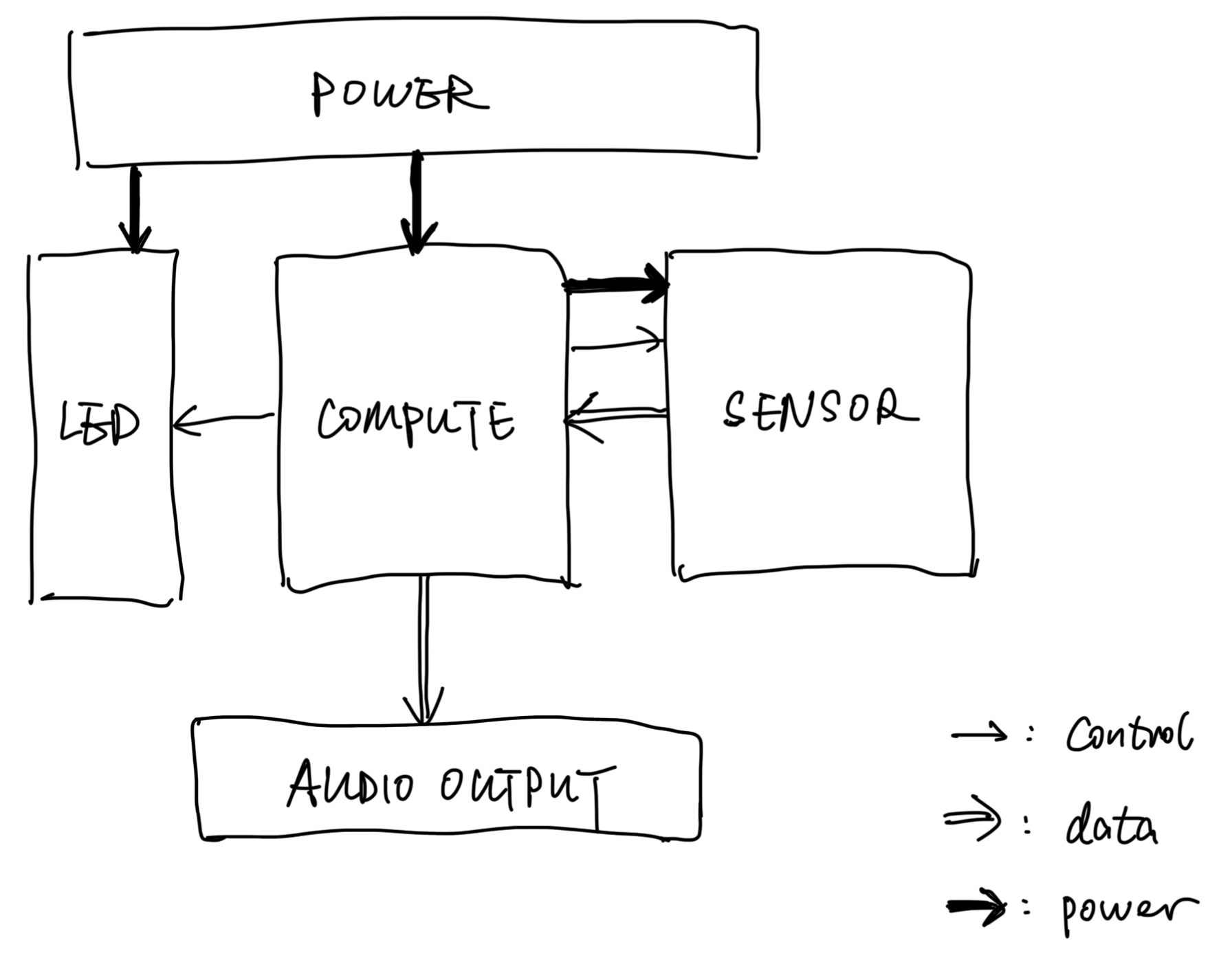
Fig. Electronics system architecture
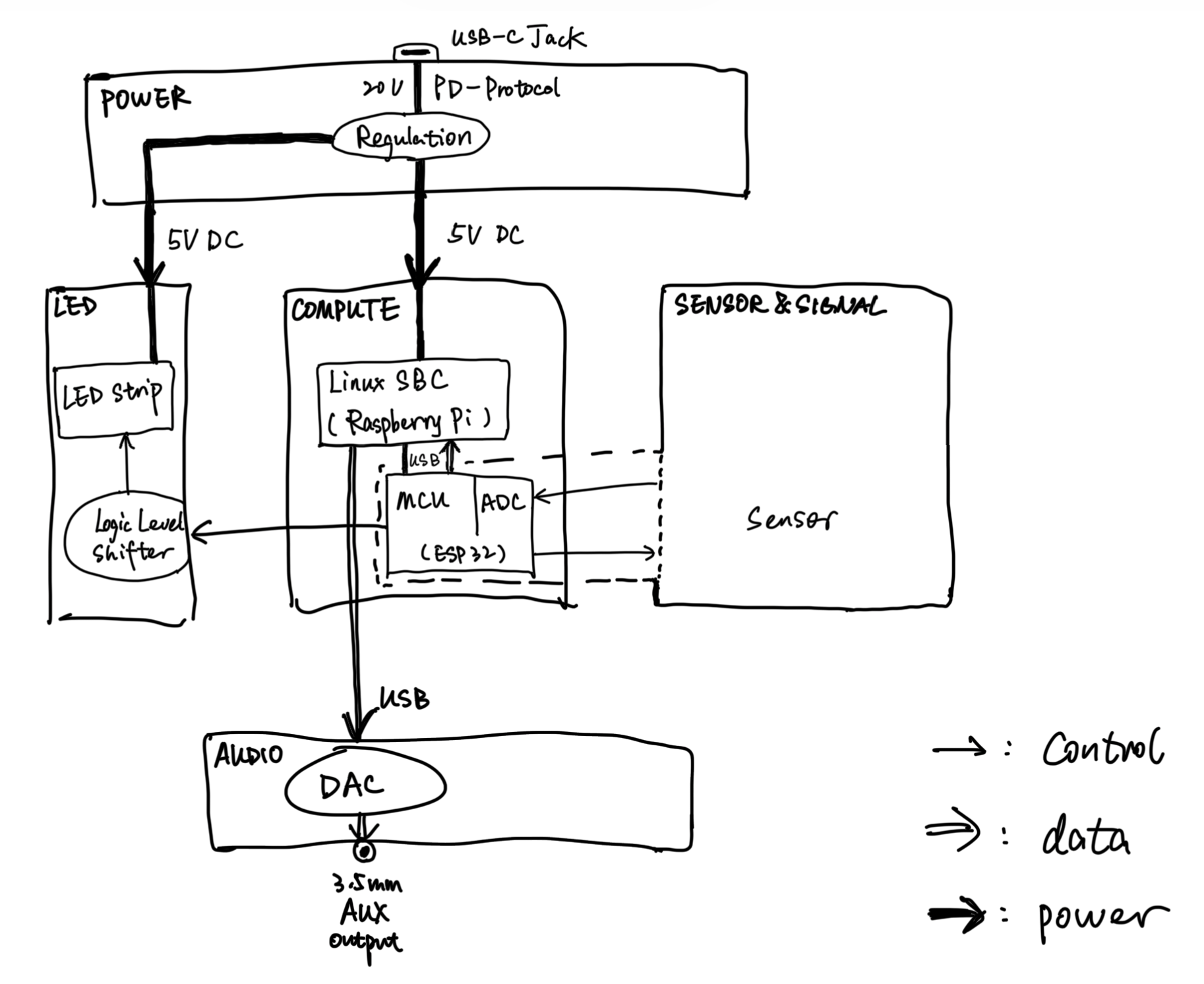
Fig. Electronics system architecture (design view)
The following walks through how this architecture was chosen.
Start with COMPUTE. Rich audio synthesis needs more than a bare MCU, so we use a Linux SBC (Raspberry Pi) for software ecosystem and USB audio. The Pi has no analog ADC for SENSOR pressure, so we add an external ADC path. We use the course ESP32 as ADC and to drive the LED strip. The Pi needs 5 V; the ESP32 can be powered from a Pi USB port.
For LED, we use WS2812B strip at 5 V with high current—it cannot be fed from Pi GPIO. Control lines are 5 V logic; COMPUTE outputs 3.3 V and needs a logic level shifter.
SENSOR receives MCU scan signals and returns sensor data.
POWER is critical. Power budget:
- LED: WS2812B, 60 LEDs/m, length π × 22.7" ≈ 71.3" ≈ 181.1 cm → ~108 LEDs. ~60 mA per LED at full white → ~6.5 A max, ~32.5 W. At ~30% brightness: ~2 A, ~10 W.
- COMPUTE: Raspberry Pi 3B, ~2.5 A typical (~12.5 W), including MCU draw.
Peak total ~45 W; at ~30% LED brightness ~22.5 W. 5 V alone is insufficient (~10 A). We use PD at 20 V (~2.5 A max input), buck down, then split feeds for LED and COMPUTE.
Next: detailed design per module.
Power module#
Option comparison:
| Option | LED adapter + Pi Micro-USB adapter | Single 5 V 10 A adapter | USB-C PD 20 V + buck |
|---|---|---|---|
| Power bank compatible | ❌ | ❌ | ✅ |
| Cable count | 2 | 1 | 1 |
| Complexity | Simple, plug-and-play | Simple, manual split | PD trigger + buck |
| Line loss | High at 5 V over long runs | Same, noticeable drop | Low current at 20 V, buck at load |
| Adapter size | Two bricks | One large brick | Compact USB-C charger |
| Outdoor deploy | Two outlets | One outlet | Power bank, no outlet |
| Chosen | ❌ | ❌ | ✅ |
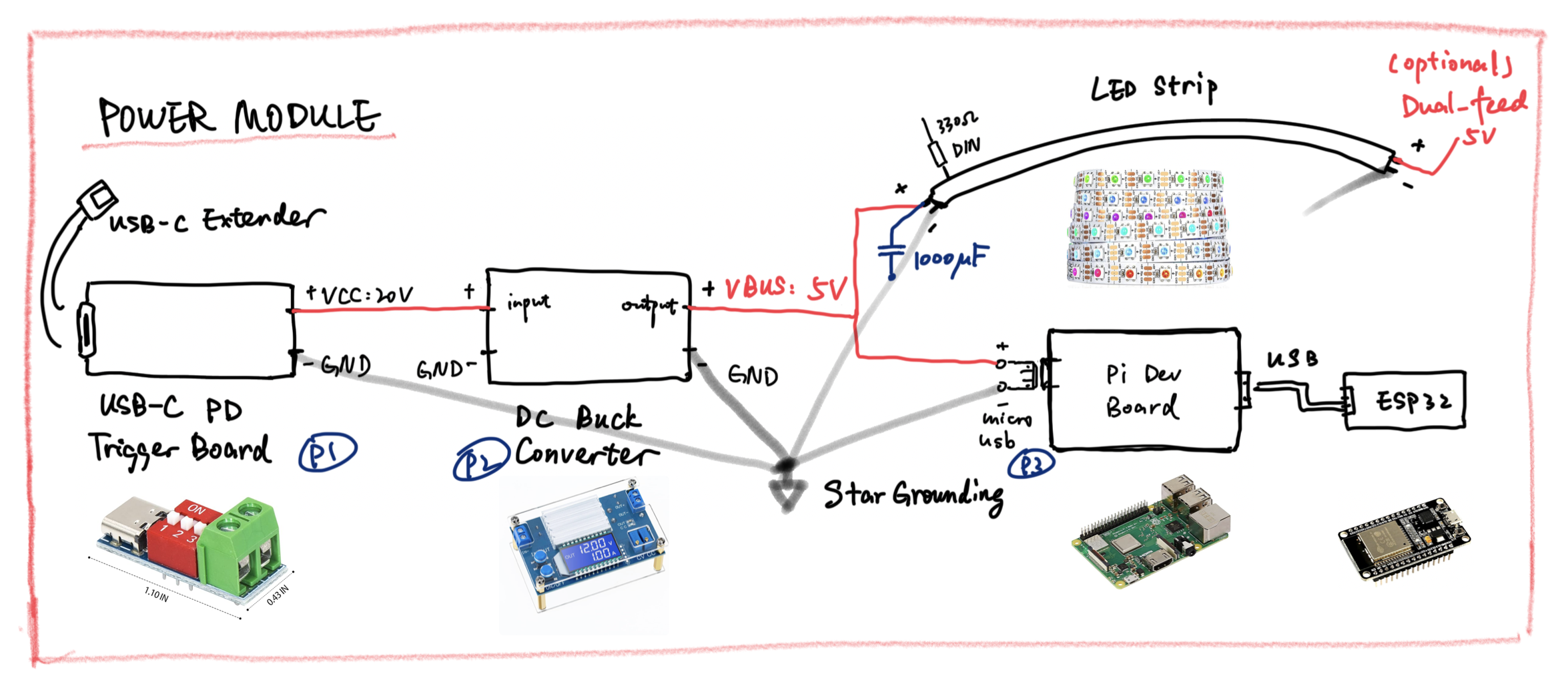
Chosen scheme: peak ~45 W. USB-C enters a PD trigger board requesting 20 V, a DC buck converts to 5 V, then two branches: LED strip and Pi via Micro USB.
LED switching causes current spikes; all grounds use a star ground to limit bus bounce. A 1000 µF electrolytic at the LED branch input absorbs WS2812B spikes so the Pi does not brown out. The Pi board already has input filtering; no extra cap there.
Long strips may droop; dual-end power (feed head and tail) is an option.
Compute module#
| Option | Single MCU (ESP32) | SBC (Pi) + external ADC IC | Pi + ESP32 |
|---|---|---|---|
| Audio synthesis | Very weak | Strong | Strong |
| Software effort | Hard | Easier | Easier |
| ADC | On-chip | External chip | ESP32 built-in |
| Complexity | Low | Medium | Low |
| Expandability | Low | Medium | High |
| Chosen | ❌ | ❌ | ✅ |
Options 2 and 3 are similar in capability; option 2 can offer better ADC precision and lower cost. We had ESP32 boards on hand, so we chose option 3.
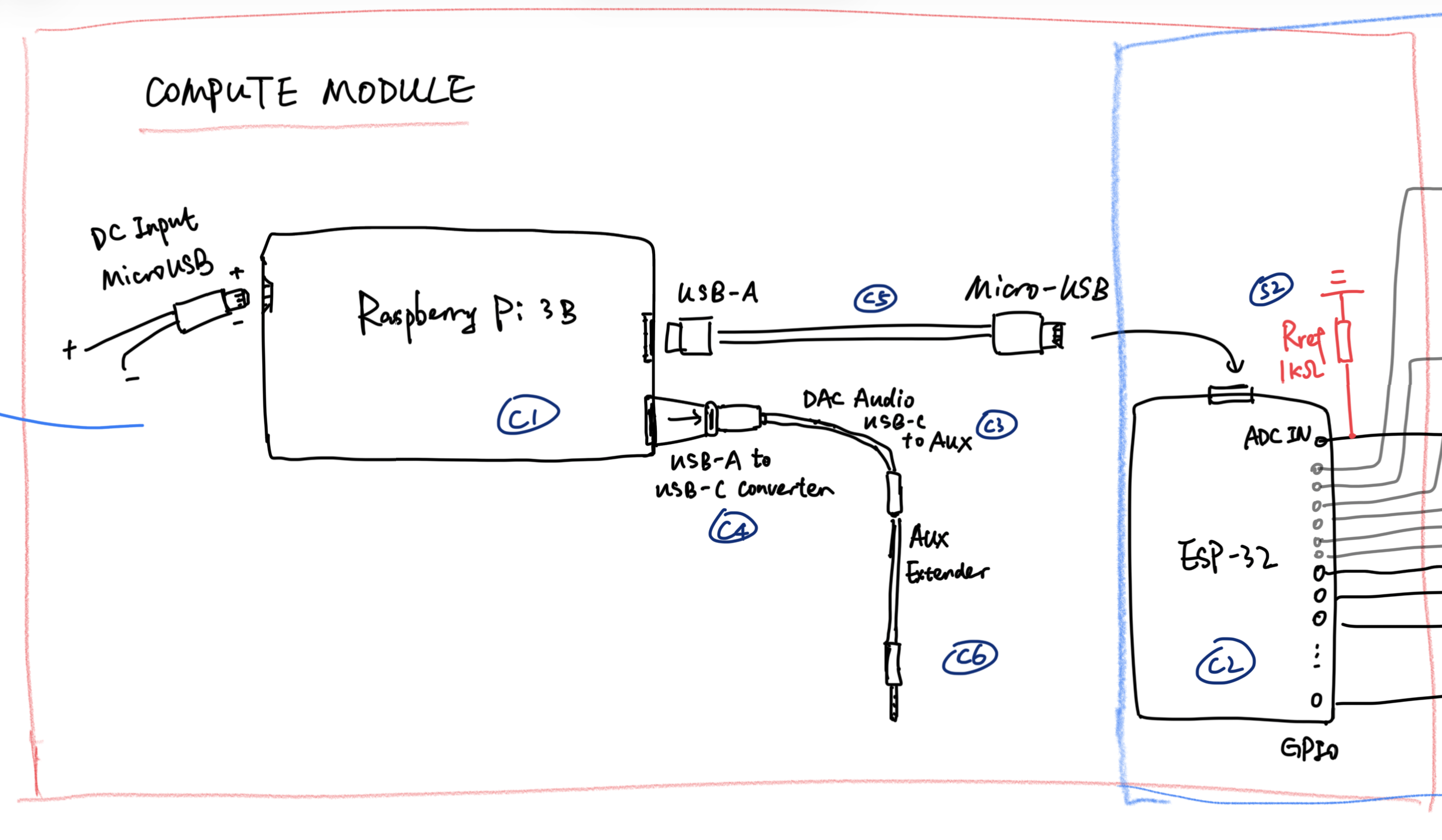
Pi 3B takes 5 V via Micro USB. One USB-A port connects to the ESP32 (power + serial): sensor data in, LED control out. Another USB-A uses an A-to-C adapter to a USB DAC; 3.5 mm analog audio runs on a long aux extension to external speakers.
LED control could live on Pi or ESP32; we use ESP32 for all GPIO, including LEDs.
Sensor module#
Array principles and layout are in SoundMat (5) Sensor Principles and Design. Here we focus on the sensor electronics.
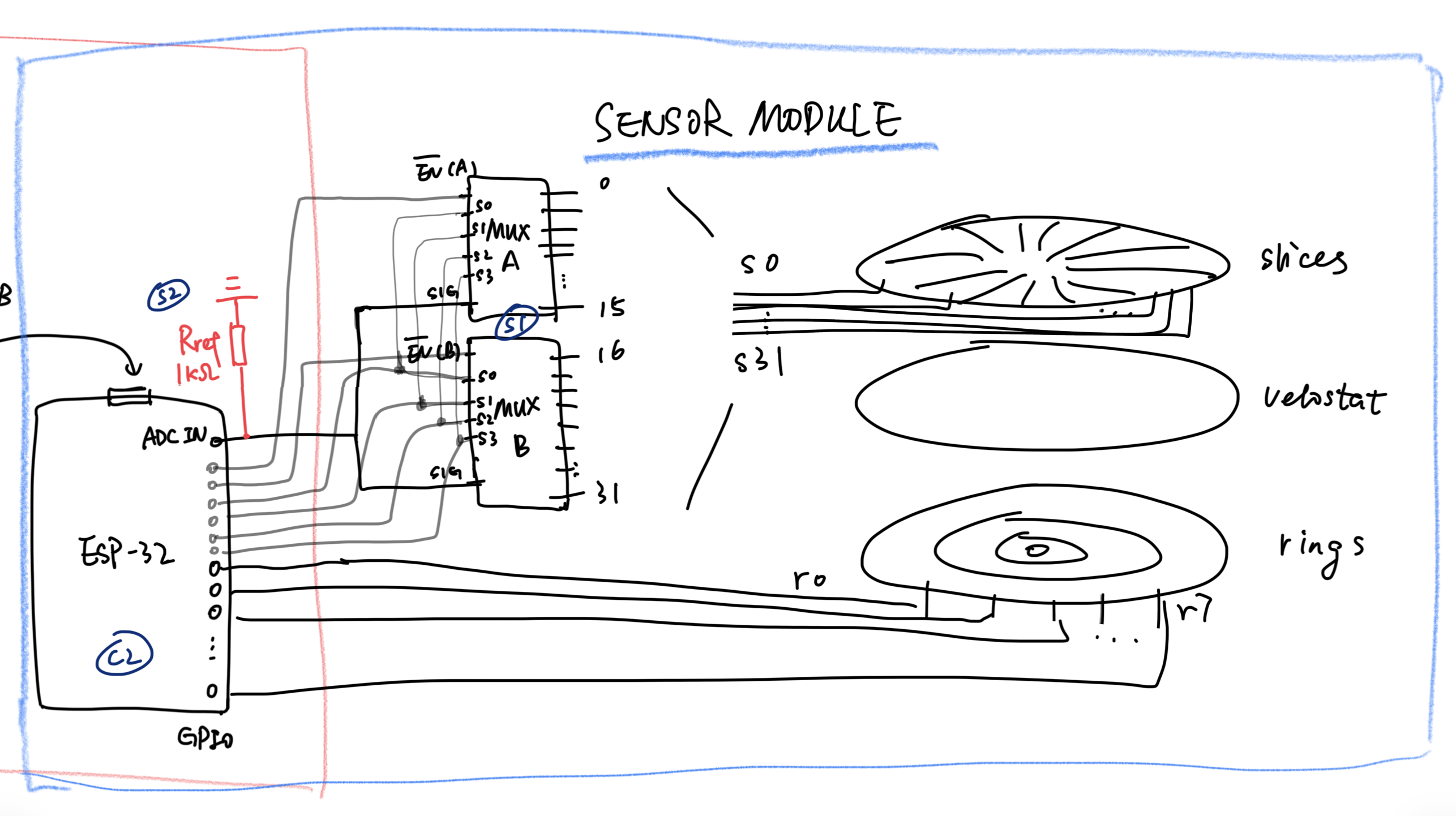
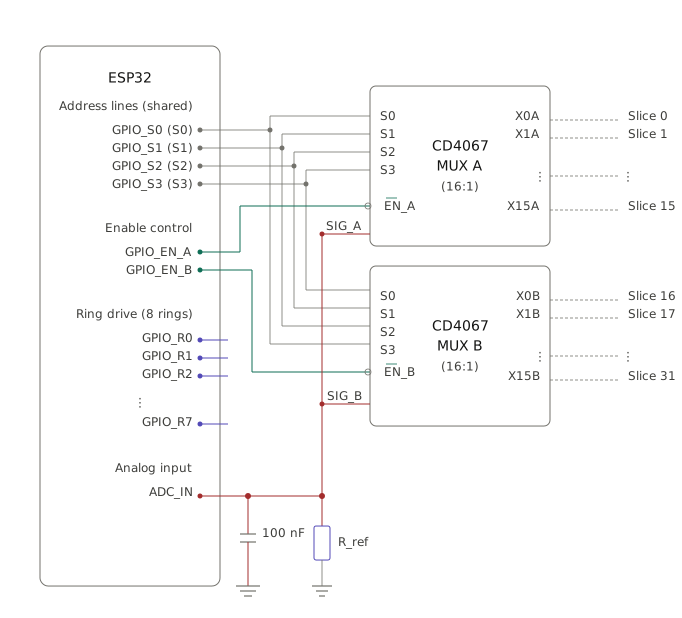
The ESP32 connects to concentric rings via eight GPIOs. Slice signals (32 lines) pass through two cascaded MUXes as below. Two GPIOs drive MUX enables; only one enable may be active at a time. The mux output SIGNAL merges into one ESP32 ADC input.
Per ESP32 Docs – ADC – Minimizing Noise, a bypass capacitor on the ADC pin reduces noise.
16:1 analog MUX selection:
| Part | Ron (on) | Switch time | Supply range | Package | Price | Notes |
|---|---|---|---|---|---|---|
| CD74HC4067 | ~70 Ω | ~30 ns | 2–6 V | DIP-24 / SOIC | ~$1 | Maker staple, cheap breakouts |
| CD4067B | ~125 Ω | ~200 ns | 3–18 V | DIP-24 | ~$0.5 | Older CMOS; higher Ron, slower; wide voltage |
| ADG1606 | ~4.5 Ω | ~120 ns | ±5 V / 12 V single | TSSOP-28 | ~$5 | Low Ron; SMD, poor for hand solder |
| ADG706 | ~2.5 Ω | ~30 ns | ±2.5 V / 5 V single | TSSOP-28 | ~$7 | Very low Ron; expensive |
| MAX306 | ~100 Ω | ~250 ns | ±15 V | DIP-28 | ~$8 | High-voltage industrial |
CD74HC4067 is the best fit; the course supplied CD4067B, which we used directly.
selection: TBD
LED module#
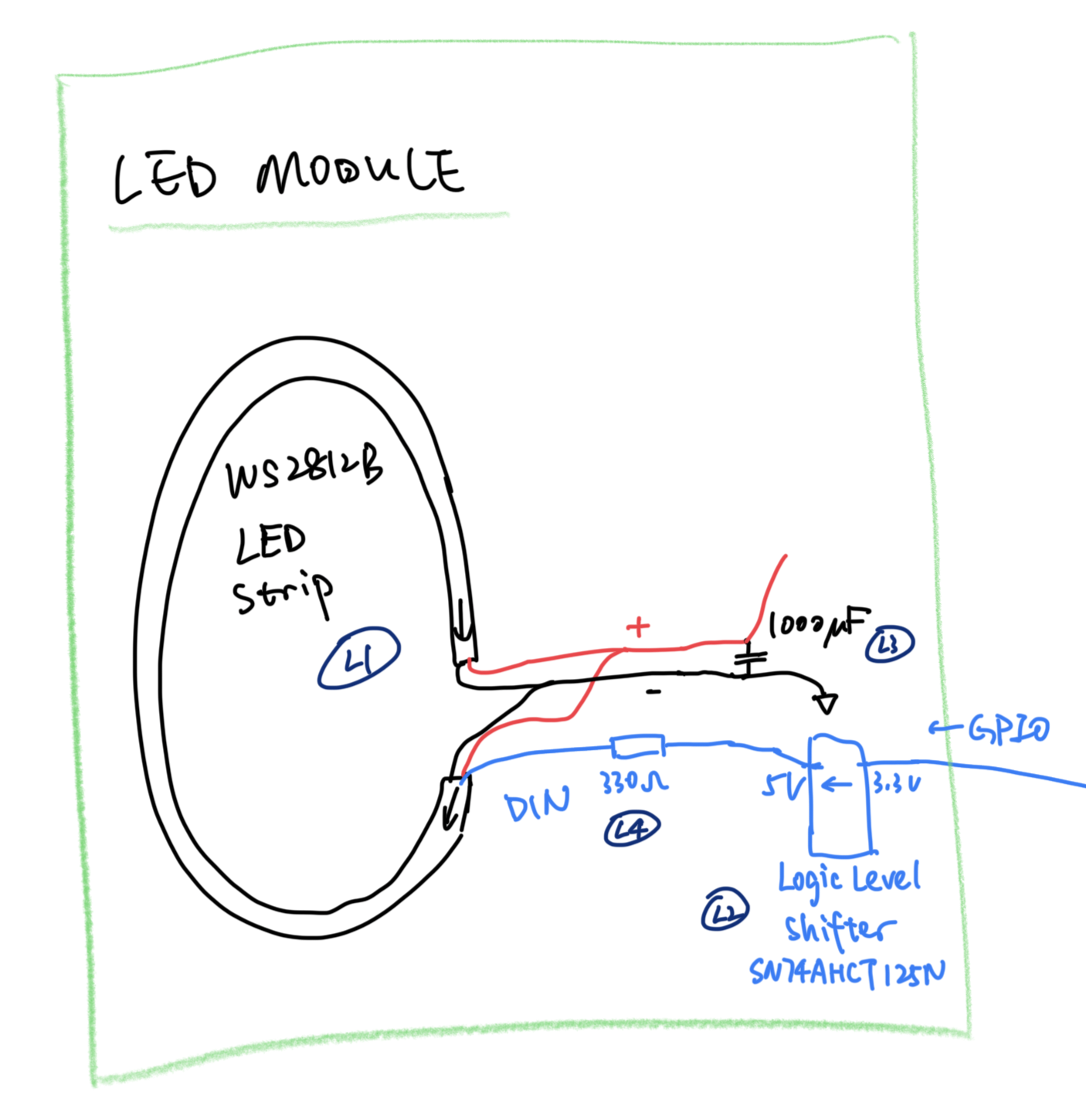
WS2812B has three pins: +5 V, GND, and 5 V DIN. Dual-end power and decoupling were covered under power; not repeated here.
COMPUTE GPIO is 3.3 V; a logic level shifter raises DIN to 5 V.
| Part | Vih threshold (VCC = 5 V) | Accepts 3.3 V in | Delay | Notes |
|---|---|---|---|---|
| SN74AHCT125N | 2.0 V (TTL) | ✅ | ~10–15 ns | Best choice |
| 74HC125 | 3.5 V (70% VCC) | ❌ | Designed for 5 V inputs | |
| 74HCT125 | 2.0 V (TTL) | ✅ | ~3–5 ns | Acceptable |
| Direct (no shifter) | 3.5 V | Sometimes works, risky | Not recommended |
HC-family thresholds follow CMOS (~70% VCC); at 5 V, “high” needs ~3.5 V, so 3.3 V is unreliable. We chose SN74AHCT125N.
330 Ω series resistor on DIN:
The WS2812B data protocol is a single-wire high-speed pulse stream; each bit period is only 1.25 µs. That means rise and fall edges are very steep—edge times on the order of tens of nanoseconds.
When a sharp voltage edge propagates from the driver along the wire to the receiver (the DIN pin of the first LED), impedance mismatch between the driver output and the line’s characteristic impedance causes reflection at the receiver. The reflected wave travels back to the driver, reflects again, and rings—oscillating between high and low several times before settling. The LED’s digital input may read one pulse as two, or a 1 as a 0. This is most visible on the first LED; later pixels see data re-shaped by the previous LED’s output stage.
A 330 Ω series resistor provides damping. Together with line characteristic impedance and parasitic capacitance at the LED input, it acts as a low-pass filter that attenuates high-frequency ringing and dissipates reflected energy in the resistor. The tradeoff is a slightly slower rise edge; with ~330 Ω and tens of pF parasitic capacitance, the RC time constant is on the order of tens of nanoseconds—still well inside the WS2812B timing budget of hundreds of nanoseconds.
Why 330 Ω? Too small (e.g. 33 Ω) leaves ringing; too large (e.g. 3.3 kΩ) makes RC so slow that pulse width distorts and communication fails. 330 Ω is a community-validated practical value.
Placement: near the LED end, not the driver. Damping must happen where reflection occurs. At the driver, the wave may have already bounced once before hitting the resistor, greatly reducing effectiveness.
by Claude Opus 4.7
Audio output module#
Audio is the final presentation layer; quality caps the experience of SoundMat as an installation.
| Option | Pi onboard 3.5 mm | I2S DAC module | USB external DAC |
|---|---|---|---|
| Quality | Poor (PWM analog, audible noise) | Good (hardware DAC, low noise) | Good (hardware DAC, low noise) |
| Wiring | No extra hardware | GPIO wiring, pin use | USB plug-and-play |
| Conflicts | None | May clash with ESP32 / other GPIO | Independent USB path |
| Software | Default | I2S + device tree | Auto-detected sound card |
| Swap hardware | — | Re-wire and reconfigure | Replace USB DAC anytime |
| Chosen | ❌ | ❌ | ✅ |
Pi 3B “analog” audio is PWM-based, not a true DAC—poor SNR, unacceptable for quiet public spaces. I2S DAC is good but more wiring. USB DAC is the simplest reliable path.
Signal chain (current): Pi USB-A → A-to-C adapter → USB-C extension → USB DAC → 3.5 mm aux → aux cable → external speaker.
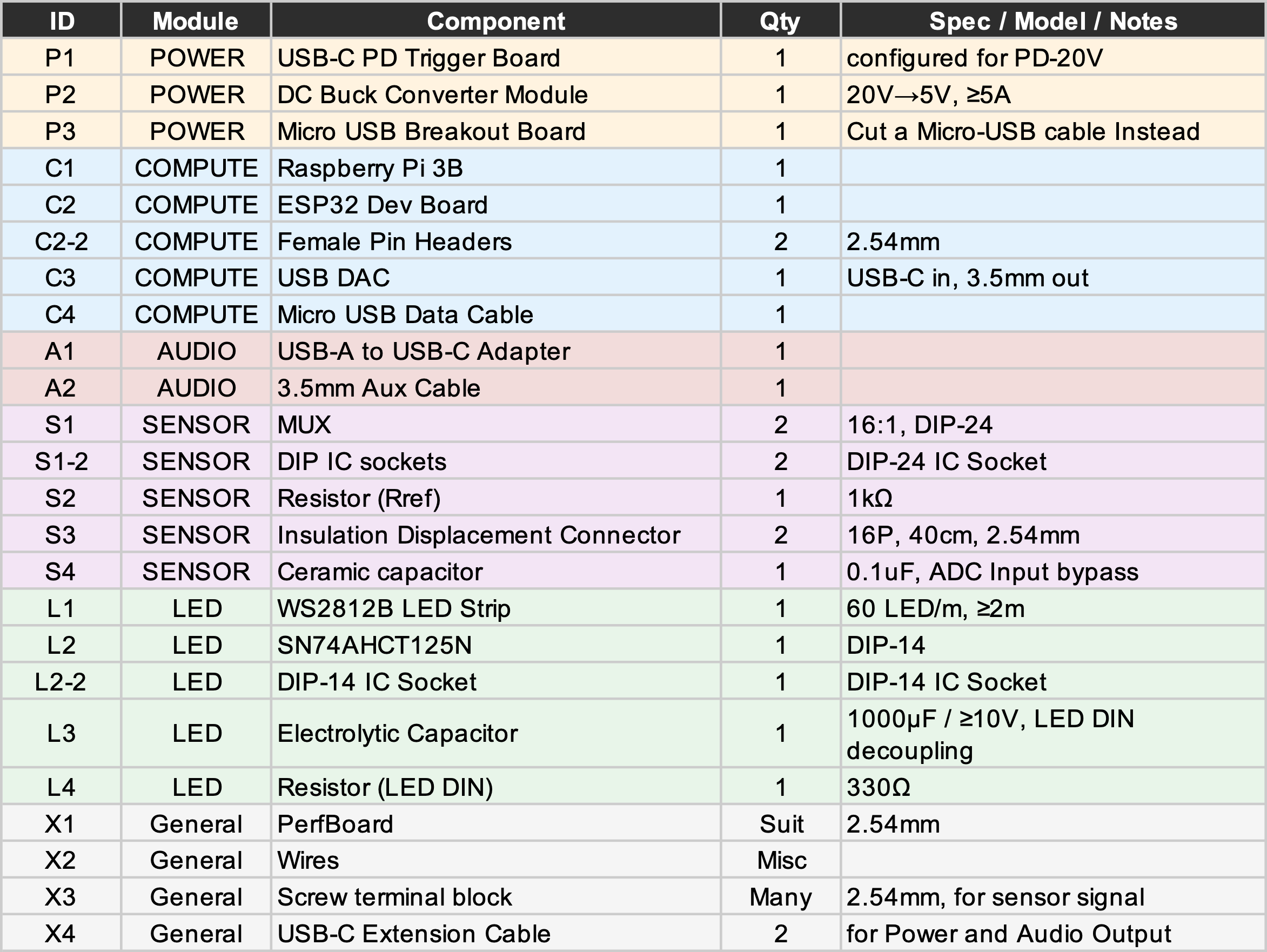
BOM#
| ID | Module | Component | Qty | Spec / Model / Notes |
|---|---|---|---|---|
| P1 | POWER | USB-C PD Trigger Board | 1 | configured for PD-20V |
| P2 | POWER | DC Buck Converter Module | 1 | 20V→5V, ≥5A |
| P3 | POWER | Micro USB Breakout Board | 1 | Cut a Micro-USB cable Instead |
| C1 | COMPUTE | Raspberry Pi 3B | 1 | |
| C2 | COMPUTE | ESP32 Dev Board | 1 | |
| C2-2 | COMPUTE | Female Pin Headers | 2 | 2.54mm |
| C3 | COMPUTE | USB DAC | 1 | USB-C in, 3.5mm out |
| C4 | COMPUTE | Micro USB Data Cable | 1 | |
| A1 | AUDIO | USB-A to USB-C Adapter | 1 | |
| A2 | AUDIO | 3.5mm Aux Cable | 1 | |
| S1 | SENSOR | MUX | 2 | 16:1, DIP-24 |
| S1-2 | SENSOR | DIP IC sockets | 2 | DIP-24 IC Socket |
| S2 | SENSOR | Resistor (Rref) | 1 | 1kΩ |
| S3 | SENSOR | Insulation Displacement Connector | 2 | 16P, 40cm, 2.54mm |
| S4 | SENSOR | Ceramic capacitor | 1 | 0.1uF, ADC Input bypass |
| L1 | LED | WS2812B LED Strip | 1 | 60 LED/m, ≥2m |
| L2 | LED | SN74AHCT125N | 1 | DIP-14 |
| L2-2 | LED | DIP-14 IC Socket | 1 | DIP-14 IC Socket |
| L3 | LED | Electrolytic Capacitor | 1 | 1000μF / ≥10V, LED DIN decoupling |
| L4 | LED | Resistor (LED DIN) | 1 | 330Ω |
| X1 | General | PerfBoard | Suit | 2.54mm |
| X2 | General | Wires | Misc | |
| X3 | General | Screw terminal block | Many | 2.54mm, for sensor signal |
| X4 | General | USB-C Extension Cable | 2 | for Power and Audio Output |
(Written May 11, 2026)